
Graphviz Layouts for Graphistry Visualization#
The graphviz engine is popular for high-quality layout of small graphs, especially trees and directed acyclic graphs (DAGs).
This notebook shows how to use graphviz for layout, then visualize interactively with Graphistry’s GPU-accelerated renderer.
For static image export (SVG, PNG for docs/reports), see the static_rendering.ipynb notebook.
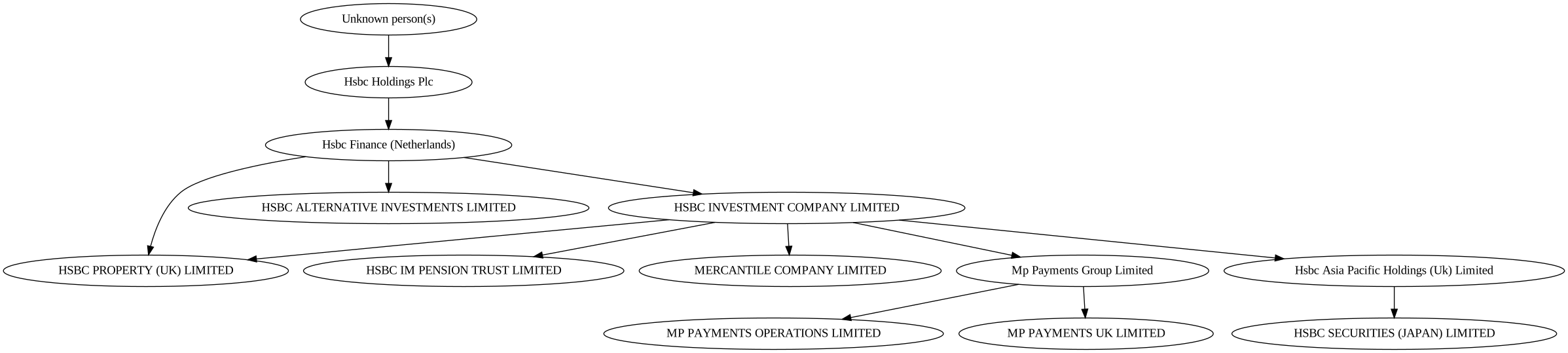
The example below shows laying out and rendering company ownership data that is in a tree and benefits from graphviz’s high-quality layout engine.
Setup#
graphviz: Install the graphviz engine and the pygraphviz bindings, see below (official tutorial )
Graphistry: Install PyGraphistry below, and get a free GPU account on Graphistry Hub or run your own server
Notes:
You must install the graphviz engine, as well as its pygraphviz Python bindings and pygraphistry
graphviz is most known for its
"dot"layout engine, and it includes others as wellgraphviz is generally not recommended for layout of graphs over 10,000 nodes and edges
[1]:
#!apt-get install graphviz graphviz-dev

#!pip install -q graphistry[pygraphviz]
Imports#
[2]:
import logging
try:
  import pygraphviz as pgv
except (ImportError, ModuleNotFoundError):
  logging.error("ImportError: Did you install pygraphviz and the supporting native packages?")
  raise

import pandas as pd
import graphistry
from graphistry import Plottable
graphistry.register(api=3, username=FILL_ME_IN, password=FILL_ME_IN)

graphistry.__version__
[2]:
'0+unknown'
Sample graph: HSBC Beneficial ownership graph#
Sample data from openownership.org. Corporate ownership graphs often have deeply tree structure, and for bigger conglomerates with numerous subsidaries, officers, board officers, suppliers, and lenders, can greatly benefit from higher-quality tree layouts.
[3]:
companies_df = pd.DataFrame([{'label': 'Hsbc Finance (Netherlands)', 'n': '1862294673469042014'},
 {'label': 'Hsbc Holdings Plc', 'n': '7622088245850069747'},
 {'label': 'Unknown person(s)', 'n': '7622088245850069747-unknown'},
 {'label': 'HSBC PROPERTY (UK) LIMITED', 'n': '16634236373777089526'},
 {'label': 'HSBC ALTERNATIVE INVESTMENTS LIMITED',
  'n': '18011320449780894329'},
 {'label': 'HSBC INVESTMENT COMPANY LIMITED', 'n': '9134577322728469115'},
 {'label': 'HSBC IM PENSION TRUST LIMITED', 'n': '1446072728533515665'},
 {'label': 'MERCANTILE COMPANY LIMITED', 'n': '6904185395252167658'},
 {'label': 'Mp Payments Group Limited', 'n': '13630126251685975826'},
 {'label': 'MP PAYMENTS OPERATIONS LIMITED', 'n': '11514603667851101425'},
 {'label': 'MP PAYMENTS UK LIMITED', 'n': '13417892994160273884'},
 {'label': 'Hsbc Asia Pacific Holdings (Uk) Limited',
  'n': '2173486047275631423'},
 {'label': 'HSBC SECURITIES (JAPAN) LIMITED', 'n': '18045747820524565803'}])

ownership_df = pd.DataFrame([{'s': '7622088245850069747', 'd': '1862294673469042014'},
 {'s': '7622088245850069747-unknown', 'd': '7622088245850069747'},
 {'s': '1862294673469042014', 'd': '16634236373777089526'},
 {'s': '1862294673469042014', 'd': '18011320449780894329'},
 {'s': '1862294673469042014', 'd': '9134577322728469115'},
 {'s': '9134577322728469115', 'd': '1446072728533515665'},
 {'s': '9134577322728469115', 'd': '6904185395252167658'},
 {'s': '9134577322728469115', 'd': '13630126251685975826'},
 {'s': '13630126251685975826', 'd': '11514603667851101425'},
 {'s': '13630126251685975826', 'd': '13417892994160273884'},
 {'s': '9134577322728469115', 'd': '2173486047275631423'},
 {'s': '2173486047275631423', 'd': '18045747820524565803'},
 {'s': '9134577322728469115', 'd': '16634236373777089526'}])
[4]:
g = graphistry.edges(ownership_df, 's', 'd').nodes(companies_df, 'n').bind(point_title='label')
[5]:
g = g.nodes(g._nodes.assign(sz=1)).encode_point_size('sz')
Minimal tree layout and graphviz layout engines#
Graphviz provides 15+ layout engines you can use. General guidance is to use for graphs up to 10,000 nodes and engines.
The "dot" layout engine is best known due to its beautiful hierarchical layouts for directed acycle graphs like trees.
[6]:
g2 = g.layout_graphviz('dot')
g2.plot()
[6]:
[7]:
# Quick static render (see static_rendering.ipynb for full guide)
g.plot_static()
[7]:
Additional layout engines beyond "dot" are below. See also the graphviz layout engines documents. The same documentation, and the below section on global graph attributes, describe options you can pass in to different layout engines.
[8]:
from graphistry.plugins_types.graphviz_types import PROGS
PROGS
[8]:
['acyclic',
 'ccomps',
 'circo',
 'dot',
 'fdp',
 'gc',
 'gvcolor',
 'gvpr',
 'neato',
 'nop',
 'osage',
 'patchwork',
 'sccmap',
 'sfdp',
 'tred',
 'twopi',
 'unflatten']
[9]:
g2b = g.layout_graphviz('neato')
g2b.plot()
[9]:
[10]:
from graphistry.plugins_types.graphviz_types import PROGS
Global attributes#
You can set global attributes. Parameter `graph_attr <https://graphviz.org/docs/graph/>`__ generally refers to layout engine options, while `edge_attr <https://graphviz.org/docs/edges/>`__ and `node_attr <https://graphviz.org/docs/nodes/>`__ are generally for default colors, sizes, shapes, etc.
[11]:
g2b = g.layout_graphviz(
    'dot',
    graph_attr={'ratio': 10},
    edge_attr={},
    node_attr={}
)
g2b.plot()
[11]:
[12]:
from graphistry.plugins_types.graphviz_types import GRAPH_ATTRS
GRAPH_ATTRS
[12]:
['_background',
 'bb',
 'beautify',
 'bgcolor',
 'center',
 'charset',
 'class',
 'clusterrank',
 'colorscheme',
 'comment',
 'compound',
 'concentrate',
 'Damping',
 'defaultdist',
 'dim',
 'dimen',
 'diredgeconstraints',
 'dpi',
 'epsilon',
 'esep',
 'fontcolor',
 'fontname',
 'fontnames',
 'fontpath',
 'fontsize',
 'forcelabels',
 'gradientangle',
 'href',
 'id',
 'imagepath',
 'inputscale',
 'K',
 'label',
 'label_scheme',
 'labeljust',
 'labelloc',
 'landscape',
 'layerlistsep',
 'layers',
 'layerselect',
 'layersep',
 'layout',
 'levels',
 'levelsgap',
 'lheight',
 'linelength',
 'lp',
 'lwidth',
 'margin',
 'maxiter',
 'mclimit',
 'mindist',
 'mode',
 'model',
 'newrank',
 'nodesep',
 'nojustify',
 'normalize',
 'notranslate',
 'nslimit',
 'nslimit1',
 'oneblock',
 'ordering',
 'orientation',
 'outputorder',
 'overlap',
 'overlap_scaling',
 'overlap_shrink',
 'pack',
 'packmode',
 'pad',
 'page',
 'pagedir',
 'quadtree',
 'quantum',
 'rankdir',
 'ranksep',
 'ratio',
 'remincross',
 'repulsiveforce',
 'resolution',
 'root',
 'rotate',
 'rotation',
 'scale',
 'searchsize',
 'sep',
 'showboxes',
 'size',
 'smoothing',
 'sortv',
 'splines',
 'start',
 'style',
 'stylesheet',
 'target',
 'TBbalance',
 'tooltip',
 'truecolor',
 'URL',
 'viewport',
 'voro_margin',
 'xdotversion']
[13]:
from graphistry.plugins_types.graphviz_types import EDGE_ATTRS
EDGE_ATTRS
[13]:
['arrowhead',
 'arrowsize',
 'arrowtail',
 'class',
 'color',
 'colorscheme',
 'comment',
 'constraint',
 'decorate',
 'dir',
 'edgehref',
 'edgetarget',
 'edgetooltip',
 'edgeURL',
 'fillcolor',
 'fontcolor',
 'fontname',
 'fontsize',
 'head_lp',
 'headclip',
 'headhref',
 'headlabel',
 'headport',
 'headtarget',
 'headtooltip',
 'headURL',
 'href',
 'id',
 'label',
 'labelangle',
 'labeldistance',
 'labelfloat',
 'labelfontcolor',
 'labelfontname',
 'labelfontsize',
 'labelhref',
 'labeltarget',
 'labeltooltip',
 'labelURL',
 'layer',
 'len',
 'lhead',
 'lp',
 'ltail',
 'minlen',
 'nojustify',
 'penwidth',
 'pos',
 'samehead',
 'sametail',
 'showboxes',
 'style',
 'tail_lp',
 'tailclip',
 'tailhref',
 'taillabel',
 'tailport',
 'tailtarget',
 'tailtooltip',
 'tailURL',
 'target',
 'tooltip',
 'URL',
 'weight',
 'xlabel',
 'xlp']
[14]:
from graphistry.plugins_types.graphviz_types import NODE_ATTRS
NODE_ATTRS
[14]:
['area',
 'class',
 'color',
 'colorscheme',
 'comment',
 'distortion',
 'fillcolor',
 'fixedsize',
 'fontcolor',
 'fontname',
 'fontsize',
 'gradientangle',
 'group',
 'height',
 'href',
 'id',
 'image',
 'imagepos',
 'imagescale',
 'label',
 'labelloc',
 'layer',
 'margin',
 'nojustify',
 'ordering',
 'orientation',
 'penwidth',
 'peripheries',
 'pin',
 'pos',
 'rects',
 'regular',
 'root',
 'samplepoints',
 'shape',
 'shapefile',
 'showboxes',
 'sides',
 'skew',
 'sortv',
 'style',
 'target',
 'tooltip',
 'URL',
 'vertices',
 'width',
 'xlabel',
 'xlp',
 'z']
Per-entity styling attributes#
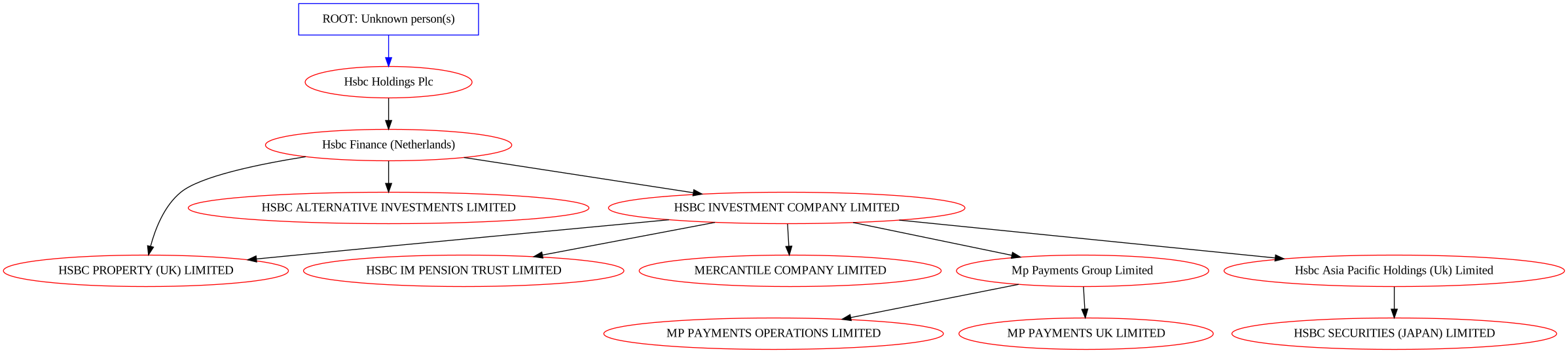
You can add graphviz-specific columns to your node and edge dataframes that configure per-row render settings. These use the same names as in the above global attribute guidance, such as color, shape, and label.
Adding a column for an attribute will typically override the global attribute for that row.
[15]:
g._nodes.apply(lambda row: row['n'], axis=1)
[15]:
0             1862294673469042014
1             7622088245850069747
2     7622088245850069747-unknown
3            16634236373777089526
4            18011320449780894329
5             9134577322728469115
6             1446072728533515665
7             6904185395252167658
8            13630126251685975826
9            11514603667851101425
10           13417892994160273884
11            2173486047275631423
12           18045747820524565803
dtype: object
[16]:
g._nodes.apply(lambda row: print('row', row['n']), 1)
row 1862294673469042014
row 7622088245850069747
row 7622088245850069747-unknown
row 16634236373777089526
row 18011320449780894329
row 9134577322728469115
row 1446072728533515665
row 6904185395252167658
row 13630126251685975826
row 11514603667851101425
row 13417892994160273884
row 2173486047275631423
row 18045747820524565803
[16]:
0     None
1     None
2     None
3     None
4     None
5     None
6     None
7     None
8     None
9     None
10    None
11    None
12    None
dtype: object
[17]:
# Per-node styling with plot_static()

root_id = '7622088245850069747-unknown'

g2c = g.nodes(g._nodes.assign(
    label=g._nodes.apply(lambda row: "ROOT: Unknown person(s)" if row['n'] == root_id else row['label'], axis=1),
    shape=g._nodes.n.apply(lambda n: "box" if n == root_id else None),
    color=g._nodes.n.apply(lambda n: "blue" if n == root_id else 'red')
)).edges(g._edges.assign(
    color=g._edges[g._source].apply(lambda n: 'blue' if n == root_id else None)
))

# Static render with per-node styling
g2c.plot_static(
    prog='dot',
    node_attr={'color': 'green'}  # default, overridden by per-node color column
)
[17]:
[18]:
g2d = g.layout_graphviz('circo')
g2d.plot()
[18]:
[ ]:
See Also#
static_rendering.ipynb - Static image export (SVG, PNG) for docs, reports, CI pipelines
Graphviz documentation - Full attribute reference
Layout catalog - All available layout algorithms