
10 Minutes to GFQL#
Welcome to GFQL (GraphFrame Query Language), the first dataframe-native graph query language. GFQL is designed to bring the power of graph queries to your data science workflows without the need for external graph databases or complex infrastructure. It integrates seamlessly with the PyData, Apache Arrow, and GPU acceleration ecosystems, allowing you to process massive graphs efficiently.
In this guide, we’ll explore the basics of GFQL in just 10 minutes. You’ll learn how to:
Query and filter nodes and edges.
Chain multiple hops and apply predicates.
Leverage automatic GPU acceleration.
Integrate GFQL into your existing Python workflows.
Run GFQL and Python on remote GPUs and remote data.
Let’s dive in!
Introduction to GFQL#
GFQL fills a critical gap in the data community by providing an in-process, high-performance graph query language that operates at the compute tier. Unlike traditional graph databases that couple storage and compute, GFQL allows you to perform graph queries directly on your dataframes, whether they’re in-memory or on disk, CPU or GPU.
Key Benefits:
Dataframe-Native: Works directly with Pandas, cuDF, and other dataframe libraries.
High Performance: Optimized for both CPU and GPU execution.
Ease of Use: No need for external databases or new infrastructure.
Interoperability: Integrates with the Python data science ecosystem, including PyGraphistry for visualization.
Sample Dataset#
Throughout this guide, we’ll work with a graph representing people, companies, and transactions with risk indicators:
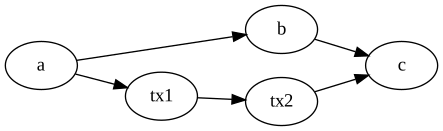
plot_static().import pandas as pd
import graphistry
nodes_df = pd.DataFrame({
'id': ['a', 'b', 'c', 'tx1', 'tx2'],
'type': ['person', 'person', 'company', 'transaction', 'transaction'],
'risk1': [False, False, False, True, False],
'risk2': [False, False, False, False, True],
})
edges_df = pd.DataFrame({
'src': ['a', 'b', 'a', 'tx1', 'tx2'],
'dst': ['b', 'c', 'tx1', 'tx2', 'c'],
'e_type': ['knows', 'works_at', 'sent', 'transfer', 'received'],
'interesting': [True, True, False, False, False],
})
g = graphistry.edges(edges_df, 'src', 'dst').nodes(nodes_df, 'id')
Setting Up GFQL#
GFQL is part of the open-source graphistry library. Install it using pip:
pip install graphistry
Ensure you have pandas or cudf installed, depending on whether you want to run on CPU or GPU.
Basic Concepts#
Before we begin with examples, let’s understand some basic concepts:
Nodes and Edges: In GFQL, graphs are represented using dataframes for nodes and edges.
Chaining: GFQL queries are constructed by chaining operations that filter and traverse the graph.
Predicates: Conditions applied to nodes or edges to filter them based on properties.
Examples#
1. Find Nodes of a Certain Type#
You can filter nodes based on their properties using the n() function.
Example: Find all nodes of type “person”
from graphistry import n

people_nodes_df = g.gfql([ n({"type": "person"}) ])._nodes
# people_nodes_df: DataFrame with 'a' and 'b' (the person nodes)
Explanation:
n({"type": "person"})filters nodes where thetypeproperty is"person".g.gfql([...])applies the chain of operations to the graphg.._nodesretrieves the resulting nodes dataframe.
2. Find 2-Hop Edge Sequences with an Attribute#
Traverse multiple hops and filter edges based on attributes using e_forward().
Example: Find 2-hop paths where edges are marked as “interesting”
from graphistry import e_forward

g_2_hops = g.gfql([ e_forward({"interesting": True}, hops=2) ])
# g_2_hops._edges: edges a->b->c (both marked interesting)
g_2_hops.plot()
Explanation:
e_forward({"interesting": True}, hops=2)traverses forward edges withinteresting == Truefor 2 hops.g_2_hops.plot()visualizes the resulting subgraph.
3. Find Nodes 1-2 Hops Away and Label Each Hop#
Label hops in your traversal to analyze specific relationships.
Example: Find nodes up to 2 hops away from node “a” and label each hop
from graphistry import n, e_undirected

g_2_hops = g.gfql([
    n({g._node: "a"}),
    e_undirected(name="hop1"),
    e_undirected(name="hop2")
])
first_hop_edges = g_2_hops._edges[ g_2_hops._edges.hop1 == True ]
# first_hop_edges: edges directly connected to 'a' (hop1=True)
Explanation:
n({g._node: "a"})starts the traversal from node"a"whereg._nodeis the identifying column name.e_undirected(name="hop1")traverses undirected edges and labels them ashop1.e_undirected(name="hop2")continues traversal and labels edges ashop2.The labels allow you to filter and analyze edges from specific hops.
4. Query for Transaction Nodes Between Risky Nodes#
Chain multiple traversals to find patterns between nodes.
Example: Find transaction nodes between two types of risky nodes
from graphistry import n, e_forward, e_reverse

g_risky = g.gfql([
    n({"risk1": True}),
    e_forward(to_fixed_point=True),
    n({"type": "transaction"}, name="hit"),
    e_reverse(to_fixed_point=True),
    n({"risk2": True})
])
hits = g_risky._nodes[ g_risky._nodes["hit"] == True ]
# hits: transaction nodes reachable from risk1 nodes and reaching risk2 nodes
Explanation:
Starts from nodes with
risk1 == True.Traverses forward to transaction nodes, labeling them as
hit.Traverses backward to nodes with
risk2 == True.Identifies transaction nodes connected between two risky nodes.
5. Filter by Multiple Node Types Using is_in#
Use the is_in predicate to filter nodes or edges by multiple values.
Example: Filter nodes and edges by multiple types
from graphistry import n, e_forward, e_reverse, is_in

g_filtered = g.gfql([
    n({"type": is_in(["person", "company"])}),
    e_forward({"e_type": is_in(["owns", "reviews"])}, to_fixed_point=True),
    n({"type": is_in(["transaction", "account"])}, name="hit"),
    e_reverse(to_fixed_point=True),
    n({"risk2": True})
])
hits = g_filtered._nodes[ g_filtered._nodes["hit"] == True ]
# hits: transaction/account nodes matching the traversal pattern
Explanation:
Filters nodes of type
"person"or"company".Traverses forward edges of type
"owns"or"reviews".Filters nodes of type
"transaction"or"account", labeling them ashit.Traverses backward to nodes with
risk2 == True.
Leveraging GPU Acceleration#
GFQL is optimized for GPU acceleration using cudf and rapids. When using GPU dataframes, GFQL automatically executes queries on the GPU for massive speedups.
6. Automatic GPU Acceleration#
Example: Run GFQL queries with GPU dataframes
import cudf
import graphistry

# Load data into GPU dataframes
e_gdf = cudf.read_parquet('edges.parquet')
n_gdf = cudf.read_parquet('nodes.parquet')

# Create a graph with GPU dataframes
g_gpu = graphistry.edges(e_gdf, 'src', 'dst').nodes(n_gdf, 'id')

# Run GFQL query (executes on GPU)
g_result = g_gpu.gfql([ ... ])
Explanation:
cudf.read_parquet()loads data directly into GPU memory.GFQL detects
cudfdataframes and runs the query on the GPU.Achieves significant performance improvements on large datasets.
7. Forcing GPU Mode#
You can explicitly set the engine to ensure GPU execution.
Example: Force GFQL to use GPU engine
g_result = g_gpu.gfql([ ... ], engine='cudf')
Explanation:
engine='cudf'forces the use of the GPU-accelerated engine.Useful when you want to ensure the query runs on the GPU.
Integration with PyData Ecosystem#
GFQL integrates seamlessly with the PyData ecosystem, allowing you to combine it with libraries like pandas, networkx, igraph, and PyTorch.
8. Combining GFQL with Graph Algorithms#
Example: Compute PageRank on the resulting graph
# Assuming g_result is the result from a GFQL query

# Compute PageRank using cuGraph (GPU)
g_enriched = g_result.compute_cugraph('pagerank')

# View top nodes by PageRank
top_nodes = g_enriched._nodes.sort_values('pagerank', ascending=False).head(5)
# top_nodes[['id', 'pagerank']]: DataFrame with highest PageRank nodes
Explanation:
compute_cugraph('pagerank')computes the PageRank of nodes using GPU acceleration.The enriched graph now contains a
pagerankcolumn in the nodes dataframe.
9. Visualizing the Graph#
Use PyGraphistry’s visualization capabilities to explore your graph.
Example: Visualize high PageRank nodes
from graphistry import n, e

# Filter nodes with high PageRank
g_high_pagerank = g_enriched.gfql([
    n(query='pagerank > 0.1'),
    e(),
    n(query='pagerank > 0.1')
])

# Plot the subgraph
g_high_pagerank.plot()
Explanation:
Filters nodes where
pagerank > 0.1.Visualizes the subgraph consisting of high PageRank nodes.
10. Sequencing Programs with Let#
GFQL’s Let bindings enable you to sequence complex graph programs as directed acyclic graphs (DAGs). This allows you to build sophisticated analysis pipelines with named operations that reference each other:
Example: Multi-stage fraud analysis
from graphistry import let, ref, call, n, e_forward, e, gt

result = g.gfql(let({
    # Stage 1: Find suspicious accounts
    'suspicious_accounts': n({'risk_score': gt(80), 'created_recent': True}),

    # Stage 2: Trace money flows from suspicious accounts
    'money_flows': [
        n({'risk_score': gt(80), 'created_recent': True}),
        e_forward({'type': 'transfer', 'amount': gt(10000)}, hops=3),
        n()
    ],

    # Stage 3: Compute PageRank to find central nodes
    'ranked': ref('money_flows', [
        call('compute_cugraph', {'alg': 'pagerank'})
    ]),

    # Stage 4: Identify high-risk clusters
    'high_risk_clusters': ref('ranked', [
        n({'pagerank': gt(0.01)}),
        e(),
        n(),
        call('compute_cugraph', {'alg': 'louvain'})
    ])
}))

# Access results from each stage
suspicious = result._nodes[result._nodes['suspicious_accounts']]
clusters = result._nodes[result._nodes['high_risk_clusters']]
# suspicious: nodes flagged in stage 1
# clusters['community']: community assignments from stage 4
Key benefits of Let bindings:
Declarative DAG: Express complex multi-stage analysis as a clear computation graph
Efficient execution: All stages execute in a single optimized pass
Named results: Access intermediate results by name for detailed analysis
Composability: Build complex patterns from simpler named operations
11. Run remotely#
You may want to run GFQL remotely because the data is remote or a GPU is available remotely:
Example: Run GFQL remotely
from graphistry import n, e

g2 = g1.gfql_remote([n(), e(), n()])
Example: Run GFQL remotely, and decouple the upload step
from graphistry import n, e

g2 = g1.upload()
assert g2._dataset_id is not None, "Uploading sets ``dataset_id`` for subsequent calls"
g3 = g2.gfql_remote([n(), e(), n()])
Additional parameters enable controlling options such as the execution engine and what is returned
Example: Bind to existing remote data and fetch it
import graphistry
from graphistry import n

g2 = graphistry.bind(dataset_id='my-dataset-id')

nodes_df = g2.gfql_remote([n()])._nodes
edges_df = g2.gfql_remote([e()])._edges
Example: Run Python on remote GPUs over remote data
def compute_shape(g):
    g2 = g.materialize_nodes()
    return {
        'nodes': g2._nodes.shape,
        'edges': g2._edges.shape
    }

g = graphistry.bind(dataset_id='my-dataset-id')
shape_info = g.python_remote_json(compute_shape)
# shape_info: {'nodes': (1000, 5), 'edges': (5000, 3)}
Example: Run Python on remote GPUs and return a graph
def compute_shape(g):
    g2 = g.materialize_nodes()
    return g2

g = graphistry.bind(dataset_id='my-dataset-id')
g2 = g.python_remote_g(compute_shape)
# g2._nodes: DataFrame returned from remote execution
Conclusion and Next Steps#
Congratulations! You’ve covered the basics of GFQL in just 10 minutes. You’ve learned how to:
Query and filter nodes and edges using GFQL.
Chain multiple hops and apply advanced predicates.
Leverage GPU acceleration for high-performance graph querying.
Integrate GFQL with graph algorithms and visualization tools.
Next Steps:
Try GFQL on Your Data: Apply what you’ve learned to your datasets and see the benefits firsthand.
10 Minutes to PyGraphistry: Utilize PyGraphistry for advanced visualization and analysis.
Join the Community: Connect with other users and developers in the GFQL community Slack channel.
GFQL opens up new possibilities for graph analysis at scale, without the overhead of managing external databases or infrastructure. With its seamless integration into the Python ecosystem and support for GPU acceleration, GFQL is a powerful tool for modern data science workflows.
Happy graph querying!